AI compute cost tool
AI inference cost calculator
Short answer: Use this calculator to normalize API inference, managed inference, and self-hosted GPU serving into monthly cost and cost per successful request.
- Defaults are hypothetical placeholders.
- Replace prices with provider pages, bills, logs, or quotes before deciding.
- No model quality, latency, throughput, or benchmark claims.
Next action
Use the calculator
Enter request volume, token or workload size, retry allowance, managed serving terms, and GPU assumptions. Then use the checklist if any field is still a guess.
Copy worksheet fieldsScenario presets
Start from a common workload shape
Pick one, then replace the defaults with your current pricing, logs, bills, and quotes. The URL updates as you edit, so a scenario can be shared and reopened.
Sample output
Sample AI Compute Cost Read
Hypothetical production realtime LLM feature. This is the kind of directional read the calculator and worksheet are designed to produce, not a quote or benchmark.
Directional read
API may still be simplest until usage is less uncertain.
Managed or self-hosted serving only becomes plausible after volume, utilization, latency, and operations ownership are clearer.
Sensitive variables
- Request volume and peak-to-average traffic.
- Output size, retries, and failed calls.
- Warm hours, useful utilization, and ops overhead.
Missing assumptions
- Current provider pricing and API invoice data.
- Latency target, real logs, failure rate, and quote terms.
- Who owns deploys, monitoring, rollback, and incidents.
Next data to collect
- 7-day request sample and p95 output size.
- Retry/timeouts, managed serving quote, and GPU quote.
- Ops owner and minimum reliability requirement.
Start here
Start with your situation
Pick the situation closest to what is happening right now. Each path leads to a calculator, worksheet, or decision page with the next useful step.
Use this calculator
How to treat the estimate
This is a directional calculator for API, managed inference, and self-hosted GPU serving cost. Default values are hypothetical placeholders, not current provider pricing or benchmark claims.
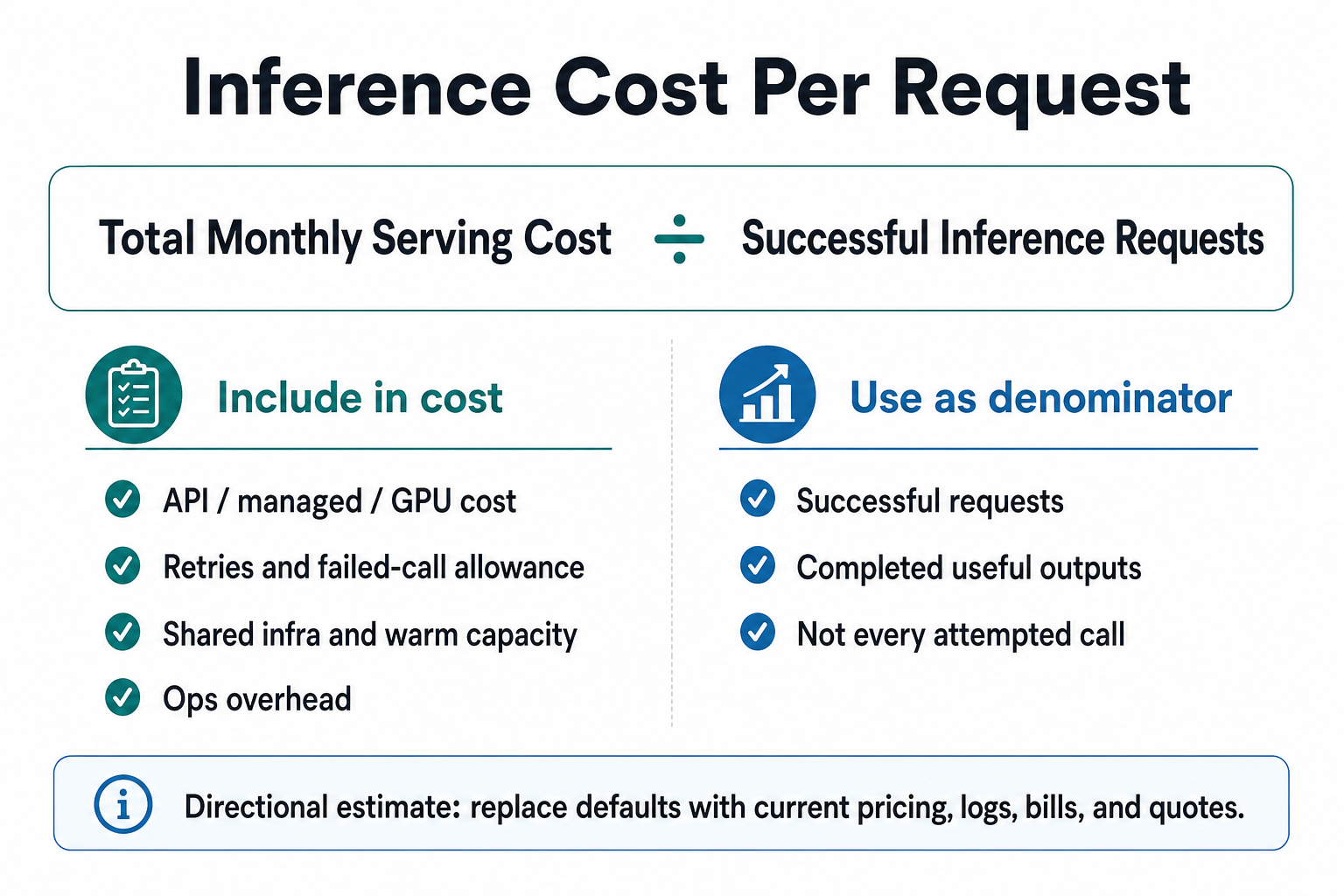
The formula visual below explains why API, managed inference, and self-hosted GPU should be normalized to successful requests. For a serious estimate, replace defaults with current provider pricing docs, observed request logs, bill data, and quotes. Useful references include OpenAI pricing, AWS SageMaker deployment docs, Vertex AI prediction docs, and NVIDIA DCGM docs.
Before treating the result as a decision, use the AI inference cost assumptions index to find missing workload fields and the provider pricing page field audit to verify which official source fields should replace placeholders.
How to use the calculator
Start with logs or a realistic launch forecast. Put current provider pricing into the API fields, quote terms into the managed fields, and the actual GPU offer into the self-hosted fields. Treat the result as a shortlist filter, not a final procurement model.
What the comparison includes
- API token-style usage with retry allowance.
- Managed inference minimum serving hours, instance count, and platform fees.
- Self-hosted GPU warm capacity, utilization, storage, networking, observability, and engineering overhead.
What can change the answer
- Batching, caching, small-model routing, or prompt reduction can lower API spend before infrastructure changes.
- Higher utilization can make direct GPU capacity more plausible.
- Strict realtime latency can make warm capacity unavoidable.
- Low operations tolerance can make managed inference cheaper in practice even when raw infrastructure looks cheaper.
FAQ
What does this AI inference cost calculator compare?
This AI inference cost calculator compares directional monthly cost and cost per successful request for API inference, managed inference, and self-hosted GPU serving. It includes request volume, input and output size, retries, idle capacity, utilization, shared infrastructure, and engineering overhead so the options use the same comparison unit.
Are the default calculator prices current provider pricing?
No. The default calculator prices are hypothetical placeholders, not current provider pricing or benchmark claims. Replace them with current provider pricing pages, bills, logs, and quotes before making a buying decision. The tool is meant to expose sensitive assumptions, not publish live rate guidance.
When can self-hosted inference cost less?
Self-hosted inference can cost less when utilization is high, traffic is predictable, control matters, and the team can operate the serving stack safely. The estimate should include warm GPU hours, idle capacity, storage, networking, observability, support, upgrades, rollback, and incident ownership before comparing it with API or managed inference.
Useful sources to replace defaults
Next pages
Turn the estimate into a decision
Use the model and decision pages once the calculator exposes the sensitive variables.
RunPlacement quiz
Pressure-test this workload
Use the calculator to find the sensitive variables, then run the quiz with the actual workload shape.
Uses workload type, budget, GPU need, data movement, priority, and ops tolerance.