GPU pricing / RunPlacement framework
Useful GPU-Hour Framework
Direct answer: Useful GPU-hour cost is the better comparison unit when GPU providers differ in utilization, queueing, reliability, storage behavior, or operational model.
- A higher listed GPU rate can be cheaper if it produces more completed work per paid hour.
- Use provider pricing pages and your own bill or quote before making a purchase or migration decision.
Definition
useful GPU-hour
A useful GPU-hour is one paid accelerator hour that actually advances the workload, excluding idle time, queue time, failed jobs, retries, and blocked data staging.
Useful GPU-hour cost = total GPU-related job cost / completed useful GPU-hours.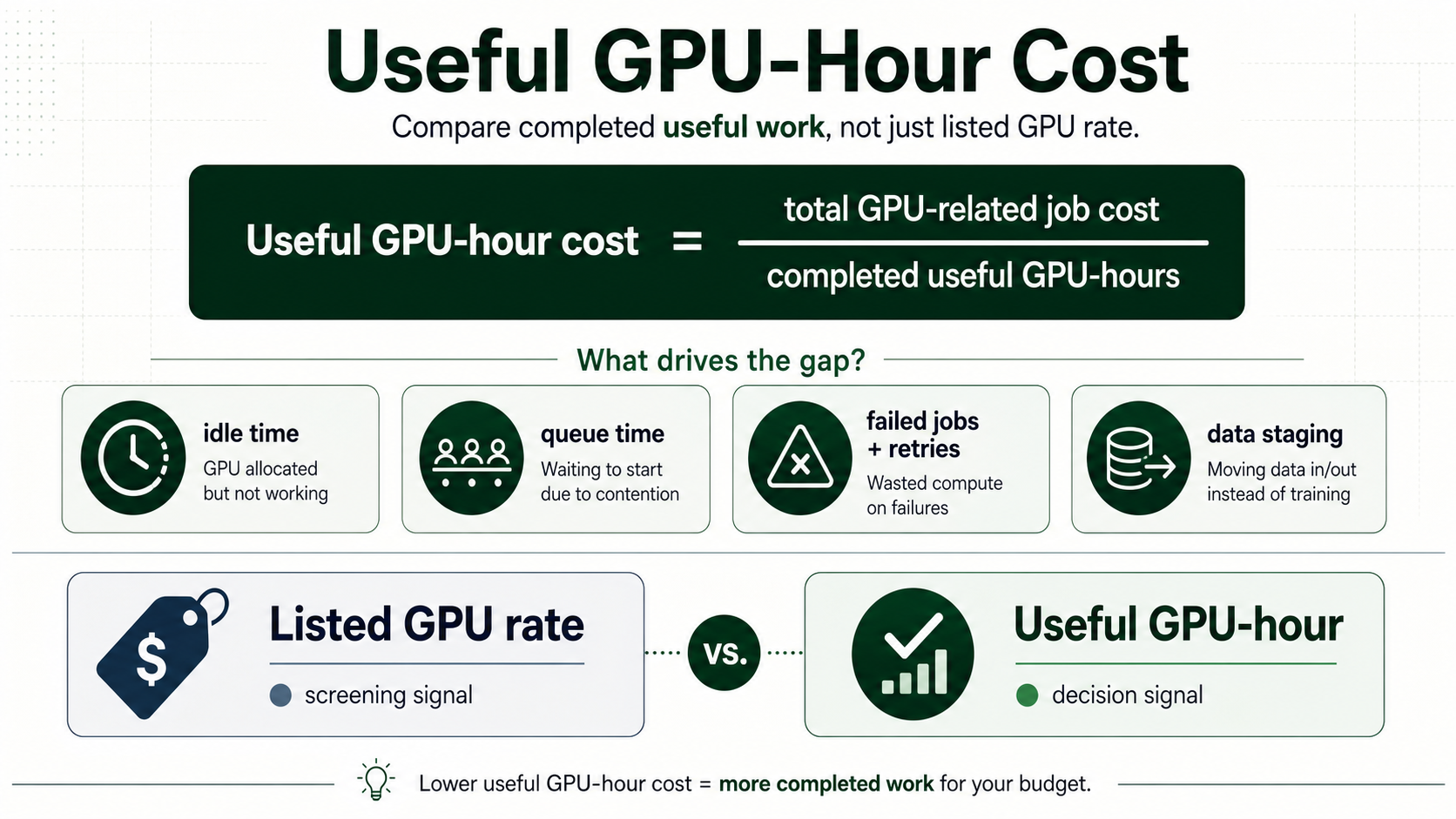
Simple version
Short version
Useful GPU-hour cost is the better comparison unit when GPU providers differ in utilization, queueing, reliability, storage behavior, or operational model.
A higher listed GPU rate can be cheaper if it produces more completed work per paid hour.RunPlacement quiz
Pressure-test this workload
A higher listed GPU rate can be cheaper if it produces more completed work per paid hour.
Uses workload type, budget, GPU need, data movement, priority, and ops tolerance.Example scenarios
A cheap GPU with frequent failed runs can cost more per completed run than a higher-priced reliable environment.
Provisioned GPU capacity with low traffic has a high useful GPU-hour cost even if the listed rate is low.
A GPU waiting on storage or transfer is paid time without useful model progress.
Decision Table
| Option | Best use | Risk |
|---|---|---|
| Listed GPU-hour | Advertised hourly accelerator rate | Screening quotes |
| Paid GPU-hour | All billable GPU time | Understanding invoice exposure |
| Useful GPU-hour | Billable time that advances the workload | Comparing provider fit |
| Completed job cost | Full run cost including storage, transfer, retries, and support | Procurement decisions |
Quality guide
How to use this framework
RunPlacement pages use public provider documentation, source-linked pricing pages where relevant, estimate-labeled examples, and practical decision frameworks. Estimates are directional and should be verified against provider pricing pages before buying or migrating.
Who this is for
- Teams comparing H100, A100, L40S, or inference quotes.
- Founders deciding whether a lower GPU rate is actually cheaper.
- MLOps teams explaining why completed work matters more than list price.
How to use it
- Start with the formula, then map every delay or retry into total GPU-related job cost.
- Use the worked examples page before sending a provider quote to finance.
- Pair this page with the GPU quote checklist when asking vendors for storage, network, and support terms.
Common mistakes
- Treating queue time as free because the GPU was not running user code.
- Ignoring failed jobs and retries when comparing managed and self-service GPU options.
- Counting provisioned hours instead of completed useful GPU-hours.
When it does not apply
- Use provider pricing pages for exact current rates.
- Use benchmarking tools for model throughput claims.
- Use a procurement review for contract terms and service credits.
Worked examples and scenarios
Queue-heavy training
A low hourly H100 quote looks attractive until jobs wait behind other tenants. The useful GPU-hour comparison asks whether the queue delay changes the total cost of completed training.
Idle inference
A service with uneven traffic can pay for idle GPU capacity. Autoscaling, batching, or a managed inference layer can beat a lower listed rate if it raises useful utilization.
Data staging
A job that spends meaningful time moving data into the GPU environment is not getting full value from the rented GPU. Include staging time, storage, and transfer in the comparison.
Worked examples
See the math in practice
Use these hypothetical examples to explain why listed GPU rate can differ from useful GPU-hour cost.
Related decisions
Apply the framework
Use these long-tail decision pages when a specific cost driver or provider choice is already visible.
An H100 quote is worth comparing only after the provider exposes the GPU shape, minimum rental window, storage, data transfer, capacity model, retry risk, and support terms.
GPU pricingGPU Cloud Idle Cost: How to Price Wasted Accelerator TimeCost estimationGPU cloud idle cost is the gap between paid accelerator time and useful workload progress. It matters most for training retries, batch queues, and inference fleets with low baseline utilization.
GPU pricingRunPod vs Lambda GPU Cloud: How to Compare the FitProvider comparisonRunPod vs Lambda is less about one universal winner and more about workload fit. Compare GPU availability, storage behavior, operational model, support needs, and total job cost for your actual workload.
AI inference cost
When the GPU question is really serving cost
Use these pages when the same GPU quote, idle-cost, or useful GPU-hour question is about production inference rather than one-off training.
Related resources
Turn the framework into a worksheet
These checklists make the concept easier to share and apply.
A practical checklist and visual worksheet for comparing GPU cloud quotes beyond the advertised hourly rate.
Workload placementWorkload Placement WorksheetChecklist / 7 sections / source-linkedA practical worksheet and decision map for deciding where a workload should run before provider choice hardens.
FAQ
Why not compare GPU clouds by hourly rate?
GPU hourly rate is only a screening number. It misses utilization, queue time, failed jobs, retries, storage, transfer, support, and whether the workload completes reliably. Compare useful GPU-hour cost or completed job cost when the providers differ in capacity, workflow, data path, or operations.
How do I estimate useful GPU-hours?
Estimate useful GPU-hours by starting with paid GPU hours, then separating the time that actually advances the workload. Idle time, queue time, failed runs, retries, checkpoint restores, and data staging delays should be measured separately. The result is directional unless it comes from real logs or bills.
Who should use useful GPU-hour cost?
Useful GPU-hour cost is for teams comparing GPU quotes or managed inference options where listed hourly rate does not explain the real cost. It is especially useful for H100, A100, L40S, training, batch inference, and provisioned inference workloads with retries, idle time, or uneven utilization.
Sources
RunPlacement quiz
Pressure-test this workload
A higher listed GPU rate can be cheaper if it produces more completed work per paid hour.
Uses workload type, budget, GPU need, data movement, priority, and ops tolerance.