GPU pricing
GPU Cloud Quote Checklist
Short answer: Use this when an H100, A100, or L40S quote looks cheap but the full workload cost is still unclear.
- This is a decision checklist, not a final price quote.
- Verify final numbers against provider pricing pages and your own bill or quote.
First pass
Use This Before You Ask For Quotes
The fastest way to compare GPU providers is to make every quote answer the same questions.
Copy the provider email
Replace the bracketed workload note with training, inference, batch, experimentation, or your actual workload.
Ask for the hidden fields
Make storage, transfer, support, queue behavior, commitments, and failure handling explicit.
Compare useful GPU-hours
Normalize around completed work, not listed hourly GPU rate alone.
Filled example
Example: Incomplete Quote Check
Hypothetical quote review, not a provider ranking.
| Input | Hypothetical value |
|---|---|
| Looks complete | GPU model, node shape, region, and hourly rate are listed. |
| Still missing | Storage, egress, queue behavior, retry handling, support tier, and cancellation terms. |
| Next move | Send the provider email block before treating the quote as comparable. |
What it flags: A low hourly rate is not enough if the quote omits the costs and terms that determine useful GPU-hours.
Use this when
- You have two or more GPU cloud quotes that are not directly comparable.
- The provider headline rate looks cheap but storage, egress, support, or capacity is unclear.
- A training, batch, or inference workload may spend meaningful time idle, queued, or retrying.
Not for
- Final procurement approval without provider quotes.
- Benchmarking model quality or throughput; this is a cost-decision worksheet.
- Picking a provider from brand preference alone.
GPU quote anatomy
The hourly rate is only one part of the quote.
A GPU quote is worth comparing only after each layer is visible.
Hourly price, GPU model, memory, and minimum rental window.
Expected hours, utilization, failed jobs, retries, and idle buffer.
Storage, ingress, egress, region movement, and dataset staging.
Provisioning, monitoring, support, SLA, queues, and incident handling.
Worksheet Fields
Use this as the working version before copying the decision into a doc, ticket, or vendor email.
| Field | Capture | Why it matters |
|---|---|---|
| GPU shape | Model, memory, interconnect, GPUs per node, region, capacity type. | Prevents false equivalence between unlike quotes. |
| Runtime reality | Expected hours, utilization, queue time, failed jobs, retries, checkpoint restores. | Turns sticker rate into useful GPU-hour cost. |
| Data path | Dataset size, storage duration, snapshots, ingress, egress, cross-region movement. | Finds the costs that often sit outside the GPU line. |
| Ops burden | Provisioning, monitoring, support, SLA, incident owner, exit path. | Shows whether the cheaper quote creates work elsewhere. |
Provider-ready
Copy Into A Provider Email
Use this as a neutral request for comparable GPU cloud quote details. Replace bracketed notes with your workload details before sending.
Subject: GPU cloud quote details for comparison

Hi [provider/team],

I am comparing GPU cloud options for [training / inference / batch / experimentation]. To make quotes comparable, could you please include:

- GPU model, memory, GPU count, node shape, interconnect, and region.
- Capacity type: on-demand, reserved, spot-like, dedicated, queued, or marketplace.
- Minimum rental window, reservation length, deposit, commitment, or cancellation terms.
- Storage included in the GPU rate versus billed separately, including persistent storage and snapshots.
- Ingress, egress, private transfer, cross-region, and cross-zone network costs.
- Queue behavior, capacity availability, failed job handling, retry behavior, and checkpoint restore assumptions.
- Support tier, SLA, incident path, and response expectations.
- Any managed Kubernetes, managed inference, observability, or platform fees.
- Spend caps, alerts, and the lowest-friction path to leave with data and artifacts.

Please label which numbers are current public pricing, quote-specific pricing, usage estimates, or contractual terms.

Thanks,
[name]
AI prompt
Prompt To Compare GPU Quotes
Paste provider replies into your AI tool with this prompt. The goal is to find missing fields and normalize around useful GPU-hours, not to rank providers by brand.
You are helping me compare GPU cloud quotes. Do not assume current provider pricing, capacity, or performance unless I provide it. Do not rank providers by brand.

Here are the quote details:
[Paste provider quote details here]

Please:
1. Identify missing quote fields across GPU shape, node shape, storage, data transfer, support, SLA, queue behavior, failure/retry behavior, and commitment terms.
2. Normalize the comparison around useful GPU-hours and total workload completion cost, not listed hourly GPU rate alone.
3. Separate public pricing, provider quote terms, workload assumptions, and unknowns.
4. Flag cost drivers that could make a cheaper listed rate more expensive in practice.
5. List follow-up questions to send each provider before choosing.
6. Avoid benchmark, provider-ranking, or current-pricing claims unless they are directly supplied in the quote.
Short Answer
- Do not compare GPU providers on hourly rate alone.
- Ask what has to be paid, moved, stored, retried, reserved, and operated for the workload to finish.
- The cheapest listed H100 can be the wrong placement if capacity is unreliable or data movement dominates the job.
Quote Fields To Request
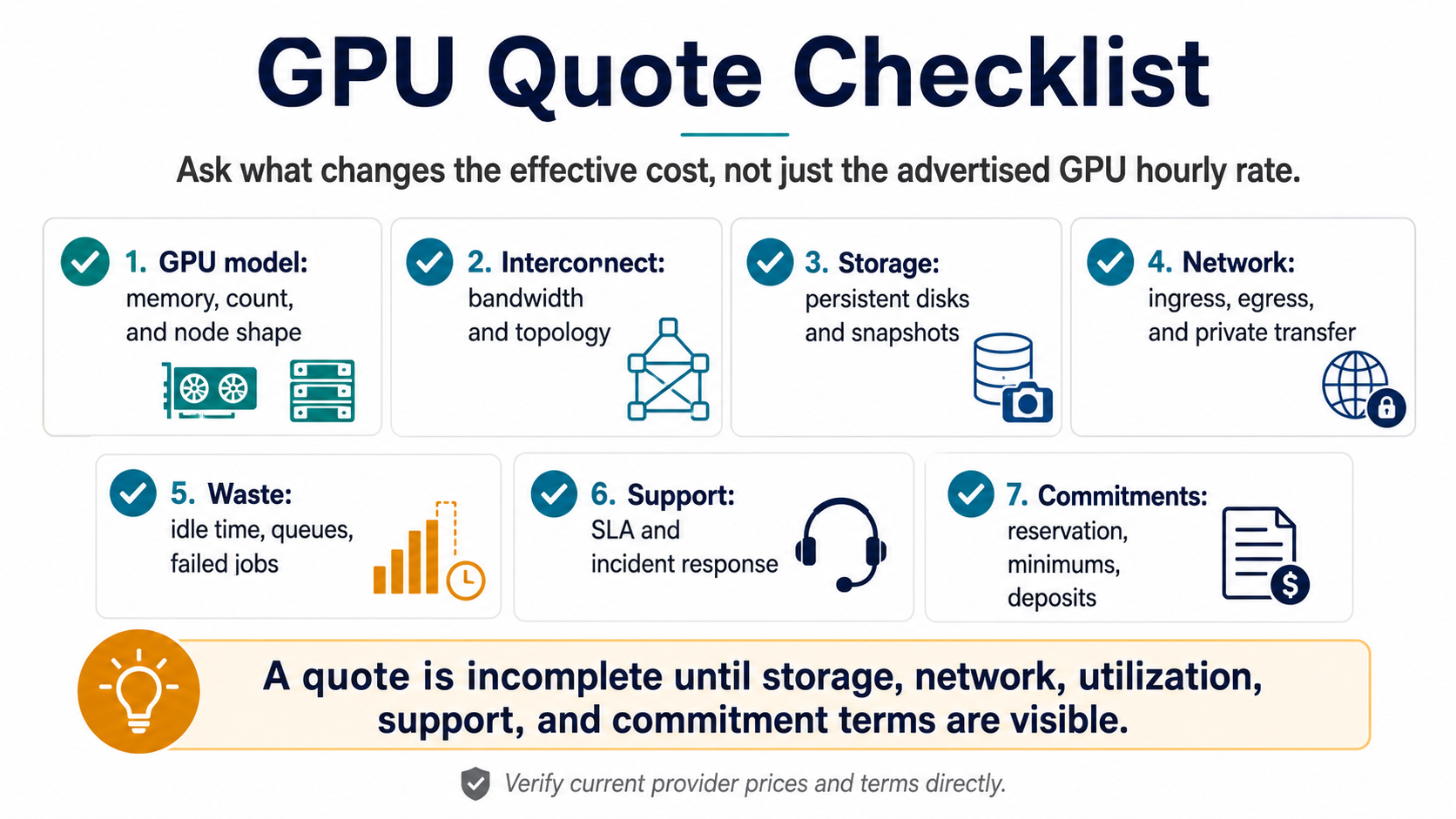
- GPU model, memory, interconnect, and number of GPUs per node.
- Minimum rental window, reservation length, commitment, or deposit.
- Storage included versus billed separately, including snapshots and persistent volumes.
- Ingress, egress, inter-region, and private network transfer charges.
- Idle capacity, queue time, failed job, and retry assumptions.
- Support level, SLA, managed Kubernetes or inference service fees.
- Whether pricing changes for spot, reserved, marketplace, or dedicated capacity.
Comparison Table
- Sticker GPU rate: useful for screening, weak for final decisions.
- Useful GPU-hour: better for training and batch jobs because utilization is visible.
- Total job cost: best for one-off training runs because retries and data movement are included.
- Monthly serving cost: best for inference because idle baseline and traffic variance matter.
- Ops-adjusted cost: best when the team has limited infrastructure tolerance.
Rough Math
- Estimated job cost = GPU hourly rate x GPU count x runtime hours + storage + transfer + managed fees + idle/retry allowance.
- Estimated inference month = baseline GPU hours + burst GPU hours + storage + transfer + observability + support.
- Utilization-adjusted GPU rate = listed hourly rate / expected utilization.
- Label every number as provider quote, observed bill, benchmark result, or estimate.
Questions To Send Providers
- What exactly is included in the hourly GPU rate?
- What happens if capacity is unavailable when the job starts?
- Are storage and data transfer billed by a separate product?
- Do failed jobs, checkpoint restores, or retries create extra billable hours?
- Can I cap spend or set an alert before the workload runs?
- What is the lowest-friction way to leave with my data and artifacts?
Red Flags
- A quote that does not mention egress or persistent storage.
- A low hourly rate with unclear capacity reliability.
- A managed inference price that hides utilization assumptions.
- A provider comparison that ignores engineer time.
- A benchmark that does not match your batch size, model size, or data path.
When To Use The Quiz
- Use the RunPlacement quiz after collecting at least one real quote or bill line.
- The quiz is most useful when you can state workload type, GPU need, data movement, priority, budget band, and ops tolerance.
AI inference cost
When the GPU question is really serving cost
Use these pages when the same GPU quote, idle-cost, or useful GPU-hour question is about production inference rather than one-off training.
FAQ
What is a useful GPU-hour?
A useful GPU-hour is paid accelerator time that actually advances the workload. It excludes idle time, queue time, failed jobs, retries, and time blocked by data staging. Comparing useful GPU-hours is often better than comparing listed hourly rates when providers differ in reliability, storage, or operations.
Should I choose the cheapest H100 cloud?
Do not choose the cheapest H100 cloud by listed rate alone. A low rate can be a poor fit if capacity is unreliable, storage or transfer is expensive, support is thin, or failed jobs create extra billable time. Compare total job cost and workload completion risk.
What should I ask before accepting a GPU cloud quote?
Before accepting a GPU cloud quote, ask what is included in the GPU rate, how storage and transfer are billed, what happens during capacity shortages, and whether failed jobs create billable time. Also ask about support, minimums, commitments, billing controls, and data exit.
Sources
- https://aws.amazon.com/ec2/pricing/on-demand/
- https://cloud.google.com/compute/gpus-pricing
- https://azure.microsoft.com/en-us/pricing/details/virtual-machines/linux/
- https://www.runpod.io/pricing
- https://lambdalabs.com/service/gpu-cloud/pricing
- https://vast.ai/pricing
- https://cloud.google.com/vpc/network-pricing
- https://azure.microsoft.com/en-us/pricing/details/bandwidth/
RunPlacement quiz
Pressure-test this workload
Compare useful GPU-hours, data movement, storage, support, capacity risk, and ops burden before choosing the lowest hourly rate.
Uses workload type, budget, GPU need, data movement, priority, and ops tolerance.