Workload placement / RunPlacement framework
Workload Placement Framework
Direct answer: Choose workload placement by matching the workload's cost driver, data movement, performance needs, operational tolerance, and commitment horizon to the right infrastructure category.
- Pick the category that removes the main constraint without creating a larger operational burden.
- Use provider pricing pages and your own bill or quote before making a purchase or migration decision.
Definition
workload placement
Workload placement is the decision of which infrastructure category should run a workload before choosing a specific provider or instance type.
Placement fit = workload constraint fit + data path fit + operations fit + cost predictability - migration risk.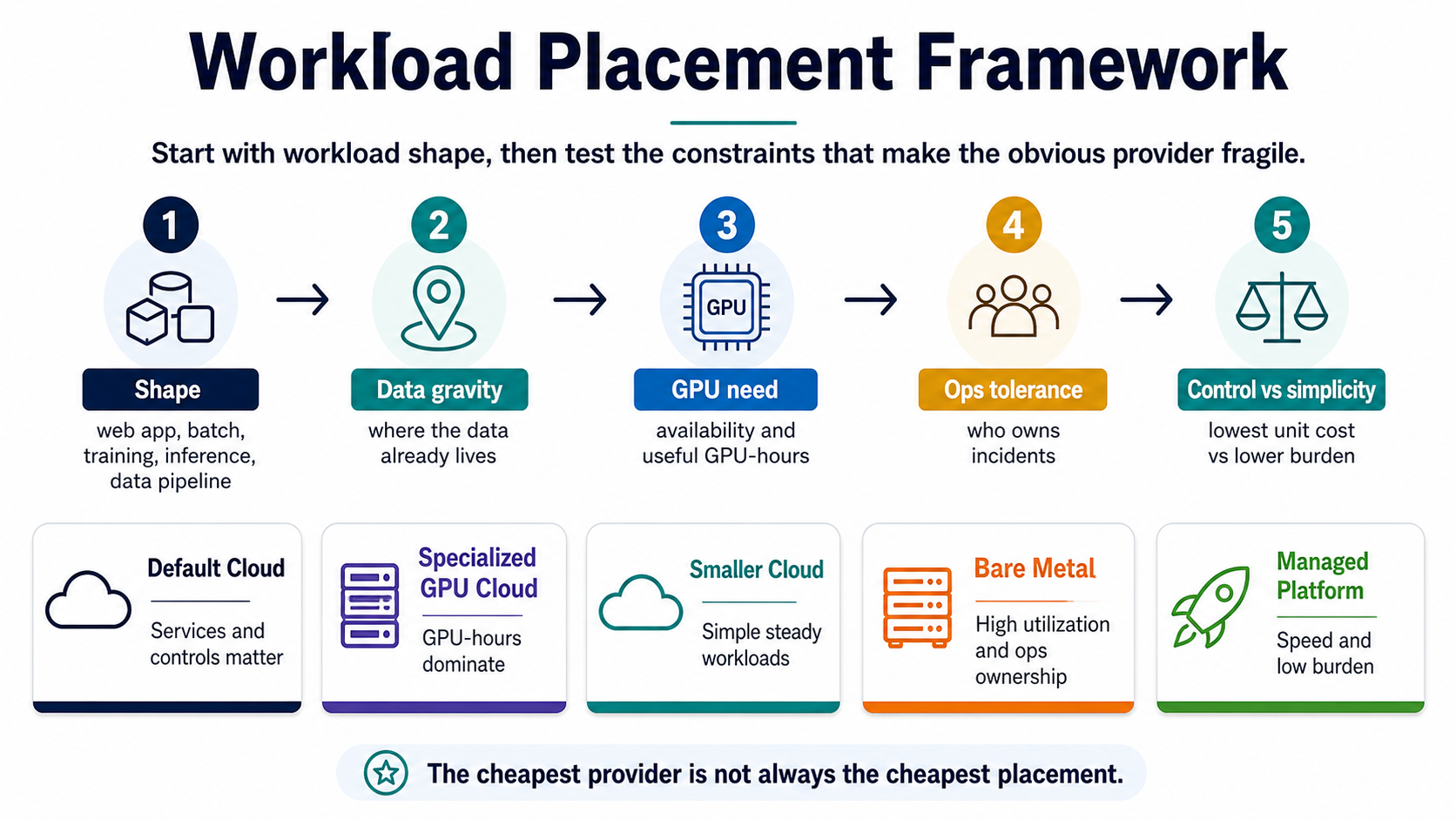
Simple version
Short version
Choose workload placement by matching the workload's cost driver, data movement, performance needs, operational tolerance, and commitment horizon to the right infrastructure category.
Pick the category that removes the main constraint without creating a larger operational burden.RunPlacement quiz
Pressure-test this workload
Pick the category that removes the main constraint without creating a larger operational burden.
Uses workload type, budget, GPU need, data movement, priority, and ops tolerance.Example scenarios
Specialized GPU cloud can fit if useful GPU-hours and data movement beat default-cloud integration cost.
Managed platform can fit if engineering focus is worth more than low-level infrastructure control.
Bare metal or committed capacity can fit if the team can operate it safely.
Decision Table
| Option | Best use | Risk |
|---|---|---|
| Default cloud | Broad managed services and enterprise controls | Can hide networking, logs, storage, and idle capacity cost |
| Specialized GPU cloud | GPU-heavy workloads with clear accelerator needs | Can add integration, data movement, and support gaps |
| Smaller cloud or bare metal | Steady, portable, high-utilization workloads | Can move ops work back to the team |
| Managed platform | Teams optimizing for speed and simplicity | Can limit control and portability |
Quality guide
How to use this framework
RunPlacement pages use public provider documentation, source-linked pricing pages where relevant, estimate-labeled examples, and practical decision frameworks. Estimates are directional and should be verified against provider pricing pages before buying or migrating.
Who this is for
- Teams choosing between default cloud, smaller cloud, GPU cloud, bare metal, or managed platforms.
- Founders who know the bill is high but not which placement category is wrong.
- Engineers translating workload constraints into infrastructure choices.
How to use it
- Classify workload shape first: web app, batch job, training, inference, or data pipeline.
- Then test data gravity, GPU need, operational tolerance, and control versus simplicity.
- Use adjacent decision pages once one constraint dominates the placement choice.
Common mistakes
- Starting with a provider brand instead of workload shape.
- Choosing the cheapest unit price without confirming who owns incidents.
- Moving the whole workload when only one expensive component needs a different placement.
When it does not apply
- Use security, compliance, or procurement review when those constraints dominate.
- Use provider calculators for exact service estimates.
- Use performance testing before changing latency-sensitive production paths.
Worked examples and scenarios
Web app
A simple web app may belong on a managed platform if speed and low incident burden matter more than low unit cost.
Training job
A repeatable training job may belong on specialized GPU cloud when GPU availability and useful GPU-hours dominate the decision.
Data pipeline
A data-heavy pipeline may need to stay near storage even if compute looks cheaper somewhere else.
Related decisions
Apply the framework
Use these long-tail decision pages when a specific cost driver or provider choice is already visible.
A managed platform can be the better placement when engineering focus and reliability matter more than infrastructure control. Direct cloud can be better when the team needs flexibility, deep customization, or lower unit cost at scale.
Cloud migrationBare Metal vs Cloud Break-Even: When Dedicated Servers WinCommercial comparisonBare metal can win when a workload is steady, portable, highly utilized, and operationally owned. Cloud usually wins when flexibility, managed services, or variable demand matter more than unit cost.
Cloud migrationCloud Egress and Exit Cost: What to Price Before MovingMigration planningCloud egress is only one part of exit cost. A serious migration estimate also prices data export, recurring transfer, storage retrieval, rewrites, testing, downtime, rollback, and new operations.
Related resources
Turn the framework into a worksheet
These checklists make the concept easier to share and apply.
A source-backed index of the assumptions to collect before choosing cloud, GPU cloud, bare metal, managed platform, or hybrid placement.
Workload placementWorkload Placement WorksheetChecklist / 7 sections / source-linkedA practical worksheet and decision map for deciding where a workload should run before provider choice hardens.
Cloud migrationCloud Exit Cost ChecklistChecklist / 7 sections / source-linkedA checklist and payback worksheet for pricing the real cost of leaving AWS, GCP, or Azure before migration starts.
FAQ
What does workload placement mean?
Workload placement means choosing the infrastructure category that fits a workload before choosing a specific provider. The decision compares cost driver, data path, performance needs, operational tolerance, and commitment risk. It can point to default cloud, specialized GPU cloud, smaller cloud, bare metal, managed platform, or staying put.
Is workload placement the same as cloud migration?
No. Cloud migration is only one possible workload placement outcome. A placement review can also show that the workload should stay where it is, move only one expensive slice, use a managed platform, or switch to specialized capacity. The goal is category fit before provider selection.
What is the first placement question?
The first placement question is which constraint matters most for this workload. Cost, latency, data movement, operational simplicity, compliance, capacity availability, and commitment risk lead to different answers. Naming the constraint first prevents a provider comparison from hiding the real decision.
Sources
RunPlacement quiz
Pressure-test this workload
Pick the category that removes the main constraint without creating a larger operational burden.
Uses workload type, budget, GPU need, data movement, priority, and ops tolerance.