AWS bill shock / RunPlacement framework
Cloud Bill Shock Taxonomy
Direct answer: Classify bill shock by driver class first: compute, network, storage, observability, managed services, support, marketplace, or commitment mismatch.
- Do not migrate because of a surprise bill until the recurring driver class is known.
- Use provider pricing pages and your own bill or quote before making a purchase or migration decision.
Definition
cloud bill shock
Cloud bill shock is a material cloud spend increase that the team cannot immediately explain by expected workload growth or a planned architecture change.
Bill shock delta = current period spend - last normal baseline; recurring shock = delta expected to repeat.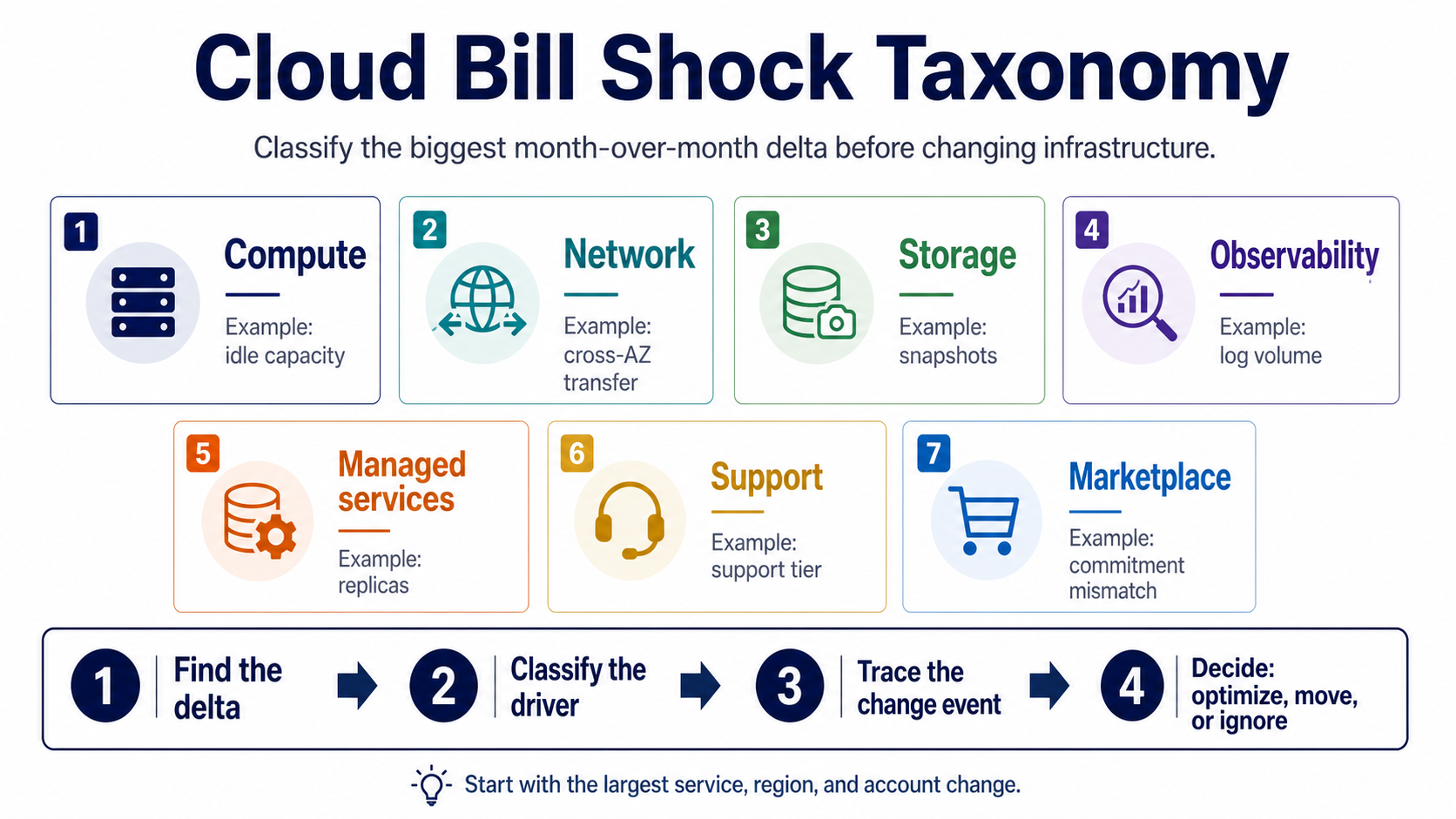
Simple version
Short version
Classify bill shock by driver class first: compute, network, storage, observability, managed services, support, marketplace, or commitment mismatch.
Do not migrate because of a surprise bill until the recurring driver class is known.RunPlacement quiz
Pressure-test this workload
Do not migrate because of a surprise bill until the recurring driver class is known.
Uses workload type, budget, GPU need, data movement, priority, and ops tolerance.Example scenarios
NAT Gateway, cross-AZ traffic, internet egress, or inter-region movement changed.
Log volume, retention, custom metrics, or debug settings expanded.
Snapshots, retrieval, replication, requests, or lifecycle gaps became visible.
Decision Table
| Option | Best use | Risk |
|---|---|---|
| Compute | Idle instances, autoscaling, GPU, commitments | Resize, delete, reserve, or re-place |
| Network | NAT, egress, cross-zone, inter-region | Change route, endpoint, region, or architecture |
| Storage | Snapshots, retrieval, replication, requests | Lifecycle, tiering, retention, or access changes |
| Observability | Logs, metrics, traces, retention | Retention, sampling, log level, or vendor review |
| Managed services | Database, queues, search, analytics | Capacity, replicas, backups, or architecture review |
Quality guide
How to use this framework
RunPlacement pages use public provider documentation, source-linked pricing pages where relevant, estimate-labeled examples, and practical decision frameworks. Estimates are directional and should be verified against provider pricing pages before buying or migrating.
Who this is for
- Teams staring at an AWS or cloud bill spike before they know what changed.
- Founders deciding whether a surprise bill means they should leave a major cloud.
- FinOps or engineering leads who need a shared vocabulary for surprise spend.
How to use it
- Find the largest month-over-month delta by service, region, and account.
- Classify the driver before proposing migration, vendor changes, or tooling.
- Use the taxonomy to decide whether the fix is rightsizing, routing, retention, architecture, or placement.
Common mistakes
- Assuming compute caused the spike before checking network, logs, storage, or managed services.
- Starting a migration conversation before identifying the bill driver.
- Averaging the whole bill instead of isolating the largest delta.
When it does not apply
- Use cloud billing exports or provider cost tools for exact line-item accounting.
- Use incident review when the bill spike came from an outage or abuse event.
- Use procurement review when support or marketplace contracts changed.
Worked examples and scenarios
NAT Gateway spike
A workload may not be compute-heavy at all. Private subnet traffic, cross-AZ paths, and managed-service routes can create a networking bill that looks like general cloud inflation.
Log volume spike
Debug logging, trace retention, or a noisy service can turn observability into the largest delta. Fix retention and sampling before changing providers.
Managed database jump
Replicas, provisioned throughput, backups, or storage growth can create bill shock without a placement problem. The taxonomy keeps the fix close to the driver.
Related decisions
Apply the framework
Use these long-tail decision pages when a specific cost driver or provider choice is already visible.
NAT Gateway bill shock usually means private subnet traffic is taking an expensive path. Start by finding which workload, route table, availability zone, or transfer pattern created the processed-data spike.
AWS bill shockAWS Pricing Calculator Alternative: What to Use for Placement DecisionsTool evaluationFor placement decisions, an AWS pricing calculator is useful but incomplete. You also need workload shape, hidden bill drivers, migration cost, operational tolerance, and whether the problem is AWS itself or one expensive line item.
AWS bill shockCloud Cost Tools for Startups: What to Use Before Hiring FinOpsCommercial investigationStartups usually need three layers: native billing visibility, lightweight alerting or cleanup, and a decision worksheet for workload placement when the bill changes the infrastructure strategy.
Related resources
Turn the framework into a worksheet
These checklists make the concept easier to share and apply.
A first-pass checklist and visual triage flow for finding the AWS line items that usually make a bill jump.
AWS bill shockAWS Bill Shock Evidence ChecklistResearch checklist / 4 sections / source-linkedA source-backed checklist for collecting AWS Cost Explorer, NAT Gateway, transfer, CloudWatch, storage, and routing evidence before changing architecture.
Workload placementWorkload Placement WorksheetChecklist / 7 sections / source-linkedA practical worksheet and decision map for deciding where a workload should run before provider choice hardens.
FAQ
What should I check first after cloud bill shock?
After cloud bill shock, check the largest month-over-month delta by service, region, and account before changing architecture. Then classify the driver as compute, network, storage, observability, managed service, support, marketplace, or commitment mismatch. The recurring driver should determine the next action.
Is cloud bill shock always a migration signal?
No. Cloud bill shock is often a cleanup, retention, routing, idle resource, or architecture issue inside the current cloud. Migration only becomes a serious option after the recurring driver is understood and the expected savings beat migration work, downtime risk, and new operations.
What is a recurring bill shock?
A recurring bill shock is the part of the cost increase expected to repeat if nothing changes. Separate it from experiments, one-time data movement, temporary traffic, or project spikes. Recurring deltas matter most because they can justify optimization, architecture changes, commitments, or migration analysis.
Sources
RunPlacement quiz
Pressure-test this workload
Do not migrate because of a surprise bill until the recurring driver class is known.
Uses workload type, budget, GPU need, data movement, priority, and ops tolerance.